> For the complete documentation index, see [llms.txt](https://help.alternativepayments.io/llms.txt). Markdown versions of documentation pages are available by appending `.md` to page URLs; this page is available as [Markdown](https://help.alternativepayments.io/integrations/accounting-integration-guides/quickbooks-desktop/one-time-payments-in-quickbooks-online-deposits.md).
# One-Time Payments in QuickBooks Online Deposits
A **one-time payment** is a payment a partner collects that is **not attached to an invoice**.
Previously, when a payout contained one-time payments, the QuickBooks deposit we created only included the invoice payments. The one-time payment money was missing, so **the deposit did not match the amount that landed in the bank** and someone had to add the difference by hand every time.
Now one-time payments are included in the same deposit as their own lines. The deposit total matches the payout, and there is nothing to fix manually.
***
#### What a partner sees in QuickBooks
Still **one Deposit per payout**, that has not changed. What changed is that the deposit can now contain extra lines.
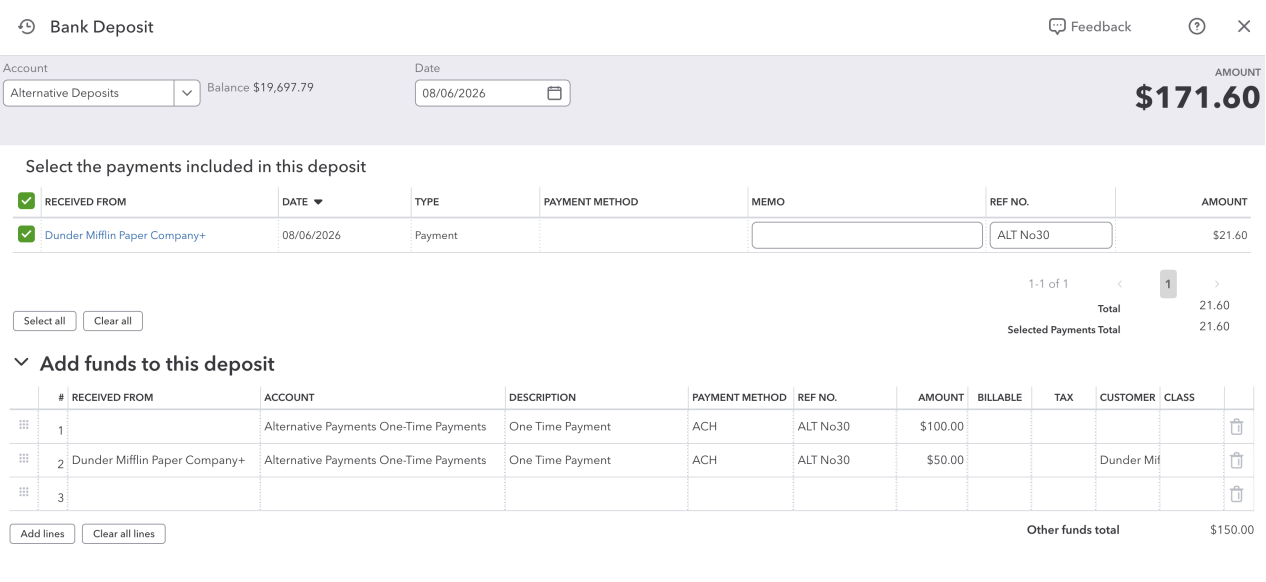
A payout with one invoice payment and two one-time payments looks roughly like this:
**Things worth pointing out**
* OTP transactions will be in the deposit funds section
* Non-identified customer transactions will have the **RECEIVED FROM** blank
* Account is selected on ALT integrations page
***
#### The One-Time Payments account
One-time payments have no invoice behind them, so they cannot go to Accounts Receivable. They are booked to an **income account**.
**By default we create an account called `Alternative Payments One-Time Payments`** (type *Income*) the first time a partner receives a payout containing a one-time payment. It is created once and reused after that.
**A partner can choose their own account instead.** In the Alternative Payments QuickBooks settings they can select any account for one-time payments, and we will book to that one from then on.
* Only **Income** and **Other Income** accounts are offered. This is deliberate, one-time payments are revenue, and booking them anywhere else misstates the books.
* If the partner selects an account, we never create ours.
* If they want the default account renamed, they can rename it in QuickBooks. We match the account we already saved, so renaming is safe.
***
#### Payment method on the line
Where possible we tag the one-time payment line with the payment method used (ACH, Credit Card, etc.), which is useful for their own reporting.
**We only ever use a payment method that already exists in their QuickBooks. We never create one.**
| Payment used | We look for a QuickBooks method named |
| ------------------ | ------------------------------------- |
| ACH / same-day ACH | `ACH` |
| Card | `Credit Card` |
If no active method with that name exists, **the line posts with the Payment Method column blank**. The deposit is still correct and complete, the tag is a nicety, not part of the accounting.
**If a partner wants the column populated:** have them create a payment method in QuickBooks with the matching name (`ACH` or `Credit Card`). Future deposits will pick it up automatically. Existing deposits are not backfilled.
***
#### Customer on the line
When we can identify the payer as a customer that is already synced to their QuickBooks, we attach that customer to the one-time payment line (the *Received From* column).
**A blank customer is normal and expected**, not an error. It happens when:
* the payment was not made by a customer in their system
* the payer exists in Alternative Payments but has not been synced to QuickBooks
* the payer couldn't be identified
The money is booked to the right account either way. If a partner wants the customer to appear, the payer needs to be a synced QuickBooks customer before the payout is processed, again, no backfill of existing deposits.
***
#### Fees
The fee on a one-time payment is booked like every other fee: a **negative line to their bank charges account** (`Alternative Payments Fees` by default, or whichever fee account they selected).
**Set this expectation clearly:** fees are not itemised per one-time payment on the deposit. A partner looking to see "the fee for *this specific* payment" will not find it on the deposit, they need the payout breakdown in the Alternative Payments dashboard.
***
#### Linking OTP to an invoice
After deposit been pushed you can link that OTP fund to an invoice on QuickBooks.
1. Go to the specific deposit where OTP sits
2. Change the OTP account to `Accounts Receivable`
3. Change the OTP `Received From` to the desired customer, then save.
4. On customer page you'll see the balance were affected by that deposit fund
5. Create a new invoice
**Love our platform?** Rate us on [Channel Program](https://channelprogram.com/v/alternativepayments) and check out our [Referral Program page](https://www.alternativepayments.io/referral-partners/)!
---
# Agent Instructions
This documentation is published with GitBook. GitBook is the documentation platform designed so that both humans and AI agents can read, navigate, and reason over technical content effectively. Learn more at gitbook.com.
## Querying This Documentation
If you need additional information that is not directly available in this page, you can query the documentation by asking a question.
Perform an HTTP GET request on the following URL with the `ask` and `goal` query parameters:
```
GET https://help.alternativepayments.io/integrations/accounting-integration-guides/quickbooks-desktop/one-time-payments-in-quickbooks-online-deposits.md?ask=&goal=
```
`ask` is the immediate question: it should be specific, self-contained, and written in natural language.
`goal` is what the user is ultimately trying to achieve, the reason they need the answer. Sharing it helps GitBook give you a better, more relevant answer. A goal is most helpful when it describes the outcome the user wants rather than restating the question. For example, with `ask=how do I create an API token`, a goal like `automate deployments from our CI pipeline` lets GitBook tailor the answer to that use case.
The response will contain a direct answer to the question and relevant excerpts and sources from the documentation.
Use this mechanism when the answer is not explicitly present in the current page, you need clarification or additional context, or you want to retrieve related documentation sections.